Wednesday, 12 June 2013

Google Glass full teardown

It was bound to happen at some point, and condolences to whomever sacrificed their frames for the greater good aside, we’ve got our first look at the components from Google Glass and how they’re fitted together. This comes from Star Simpson and Scott Torborg, who start their journey with a brief write up on picking up the Glass unit, and following it up with a detailed teardown of the unit, including a test using prescription frames.
Glass Teardown
Initially, the process involved concerns about how hard it would be to get Glass open, but fortunately the process starts with a screw and is fairly straight-forward from there. Those who don’t have any experience taking apart small gadgets should avoid tinkering with their Glass unless they’re willing to make a fatal mistake, but that aside, disassembling the unit is certain do-able (not without permanent damage, however).
The process started with a Torx T5 screwdriver that was used to remove the main unit from the frames, presumably so that a user can swap out the frames with new ones. Of course, this presents a perfect opportunity to check out the unit on a pair of prescription glasses. Reportedly, this experience was “subpar” because it threw off the proximity sensor.
Glass 2
From there, they removed the plastic from the main unit near the display, which was achieved with some careful prying. This revealed the proximity sensor and ambient light sensor. Unfortunately, taking off the rest of the plastic involved some cutting around an internal screw, at which point the screw could be removed and the rest of the plastic “peeled” off.
From there they removed the main board, which is held in place with “lots of paste.” Removing said paste revealed a TI OMAP4430 chip and a 16GB SanDisk flash chip. Next was the battery, which also required tearing the plastic in order to get to it. Obviously, this means users cannot replace the battery on their own. The rest of the teardown is detailed in extensive pictures, which you can check out at the link below.
SOURCE: Catwig

Android 4.2.2 update for Samsung Galaxy Note II and S3 delayed

Samsung’s Galaxy Note II and Galaxy S3 have been updated both to Android 4.1.2 Jelly Bean a while ago, and of course they’ll get newer software builds in the future. Although it might not be the near future.
According to Sam Mobile (which is usually spot on with details like these), Samsung has delayed the Android 4.2.2 update for the Note II and Galaxy S3. The reason seems to be the new version of TouchWiz that needs to be tested on the handsets.
Unfortunately, Sam Mobile doesn’t know when the update will be rolled-out. But let’s hope we’ll hear more about this soon. In any case, the Note II and the S3 will certainly be updated beyond Android 4.2.2.
Samsung Galaxy S3 Note II Android 422 update delaied
Luckily, newer Samsung devices – like the Galaxy S4, Galaxy S4 Mini, Galaxy Mega (6.3 and 5.8), or even Galaxy Ace 3 – run 4.2 Jelly Bean out of the box, so their users won’t have to wait for this version of Android.

Grand Theft Auto V

article-titleSony announced on Monday that it will offer a Grand Theft Auto V PS3 bundle in September, and now publisher Rockstar has followed up by teasing nine action-packed screenshots for its upcoming title.
Sony first showed off the screen grabs for Grand Theft Auto V during its PlayStation press event on Monday at E3 in Los Angeles, but Rockstar made them available for everyone's perusal on Tuesday via the game's website.
The images depict Grand Theft Auto 5's three protagonists, Michael, Franklin and Trevor, as well as some fiery action with vehicles including boats, jet skis and planes. Check them out in the gallery below.
Rockstar first released a dozen Grand Theft Auto V screens in May to highlight enticing capabilities and scenes like scuba diving, skydiving and heist missions. They also gave sense of scale, as the game will allegedly have the biggest playable map since Red Dead Redemption.
Rockstar's Grand Theft Auto V originally had a spring 2013 release, but it is now aiming for 17 September. .

Facebook for BlackBerry 10 update brings album creation and Much More

Screenshot_2013-06-12_12_28_AM-5
Facebook for BlackBerry 10 has slowly been creeping up to feature parity with its iOS and Android counterparts. When Microsoft collaborated with the social networking giant in April to bring a Modern UI-friendly redesign to Facebook for Windows Phone, it was BlackBerry 10 left as the virtual pariah.
With version 10.2, BlackBerry 10 users now have the ability to upload photo albums, add photos to uploaded albums, tag their friends and family members, in addition to a number of other usability tweaks.
There’s also an updated newsfeed design that adheres more closely with the rest of the platforms; expect wider photos (plus) and more ads (minus).
If you’re a Facebook user on the BlackBerry Z10 or Q10, get downloading.

The Walking Dead will rise in the new

walkingdead400days
Telltale’s The Walking Dead has been an incredible series loved by fans of the series and gamers alike. The next episode in the series, entitled 400 Days has been announced for the Playstation Network, PC, Xbox Live and Playstation Vita, with many more platforms to follow. Telltale unveiled their new trailer for the game at E3 today and here’s what it looks like:
The trailer starts in a dilapidated gas station. Empty fuel pumps and long grass occupy the rural landscape.  A lone girl exits a diner in a small town only to find a man blindfolded, about to be executed by a group of people. A title tells us the game will have “Five Stories”  and we see a flash of friendly and unfriendly faces. It’s all about “One Episode”  as we see a group of prisoners watching a group of prisoners being attacked outside their bus. A lone hitchhiker turns to see an approaching vehicle before cutting to a zombie clawing at someone’s legs. A red-headed girl huddles through a cornfield while torches look for her. Tension and chaos are ratcheted up as we see a timelapse of that original gas station and the music climaxes as we reveal the logo.
walkingdeadwait

Nexus 7 Dock Vanishes Amidst Nexus 7 2 Rumors


That of course isn’t set in stone but thanks to the success of the original Nexus 7, it would be shocking to see Google pass up the opportunity to release another 7-inch tablet.

PlayStation 4 Hard Drive is User Replaceable

Every PlayStation 4 console will ship with a 500GB hard drive built-in, but gamers who want or need more storage have the option to replace the hard drive.
Sony told Polygon that gamers can swap out the hard drive in the PlayStation 4, just like they could with the PlayStation 3. Sony’s current console uses a 2.5-inch hard drive, the same sized used in laptops, that users can replace at will. Presumably the PlayStation 4 will use similar hard drive discs.

PlayStation 4
By giving gamers the option to replace the hard drive in the console Sony lets gamers put larger hard drive in the console for those who want to store many digital ames on their console at once. Those who can afford the drives can put 1TB or larger drives into the console.
Drives with 1TB of storage start at about $110 on NewEgg, so for about the same the price of an Xbox One gamers can have a PlayStation 4 with twice the storage space.
Gamers should also have no trouble installing solid state drives (SSDs) for much faster performance. SSDs are more expensive than their spinning-disc brethren for less storage. The increase in speed is likely enough to convince some gamers to swap out the 500GB hard drive for an SSD.
For it’s part, Microsoft will let gamers replace the hard drive in the Xbox One, but users have to use Microsoft’s proprietary hard drives in the console. Gamers who want more storage space on their drive have to wait for Microsoft to release a larger proprietary hard drive they want.
Microsoft’s plan for the Xbox One is the same as it’s hard drive options for the Xbox 360. Upgrading an Xbox hard drive is quite easy, but users pay extra for the added convenience and fewer choices.
Most gamers will never replace the hard drive in their console, but Sony’s news is good news for those who want to or have to because of a hard drive failure.

Gameloft’s Asphalt 8 Coming To iPhone & Android

The latest entry into Gameloft’s popular franchise Asphalt 8 will let players drive a variety of cars through racetracks across the globe. The game will feature eight entirely new maps including tracks in the Nevada desert and the streets of London. The popular Monaco track from Asphalt 7 will also return with a few changes.
Asphalt 8 will introduce new weather effects across all tracks including rain, ice, snow and dust. To use Gameloft’s examples, players will hydroplane across puddles after a huge rain storm in Tokyo or slide across ice in the frigid streets of Finland.
Like previous games in the series, Asphalt 8 tracks will have several shortcuts scattered throughout so the weather effects may help players stumble upon faster routes through the race.

iPhone Thieves Will See After the iOS 7 Release

Apple announced a new iOS 7 feature design to stop iPhone theft by locking the iPhone and iPad to a user account. This isn’t the kill switch that police and legislators called for, but it is a good start to discouraging iPhone theft.
iOS 7 will now ask if a computer should be trusted when plugged in for the first time and if a user attempts to restore the iPhone while Find My iPhone is on it will fail.
With these iOS 7 restrictions in place thieves will no longer be able to steal an iPhone, wipe it clean and resell it. As long as no one finds a work around, this could significantly reduce the demand for a stolen iPhone.
If there is no way to wipe it clean, it will prove difficult to sell the used iPhone, at least to some one who wants to use it again. In theory the iPhone could still be broken down for parts, but iPhone thefts reportedly often end up resold in specific neighborhoods or shipped overseas.
When plugging an iPhone running the iOS 7 beta into a new Mac, the iPhone popped up the message below, asking if it can trust this computer. If the iPhone is locked it will require a user to unlock it before this happens. Even if users don’t lock their iPhone, they will be able to use Find My iPhone to lock it after it is lost or stolen.
IOS 7 Security - prevent iPhone theft
Even if the thief is able to connect a stolen iPhone to a computer before it is locked and click Trust, iTunes will not restore the iPhone if Find My iPhone is turned on. This should make it impossible to restore the stolen iPhone to stock and sell it to someone else.
iPhone Security iOS 7
If we can’t stop iPhone theft with officer deterrents and educating users about the dangers of walking down the street holding a gadget worth $600 in their hand, hitting the secondary market could be the best way to limit iPhone theft.
Apple announced many iOS 7 features at the WWDC 2013 Keynote this week, including a complete overhaul to the look of the iPhone user experience and 50 iOS 7 features you’ll actually use. The iOS 7 release date is set for fall, when it will arrive on the iPhone 5, iPhone 4S and iPhone 4 as well as recent iPad models. Users can get the iOS 7 beta today, if they are ok with some possible hiccups.

iOS 7 Beta Per-App Cellular Data Usage, Live Clock Icon, Panoramic Wallpaper and More


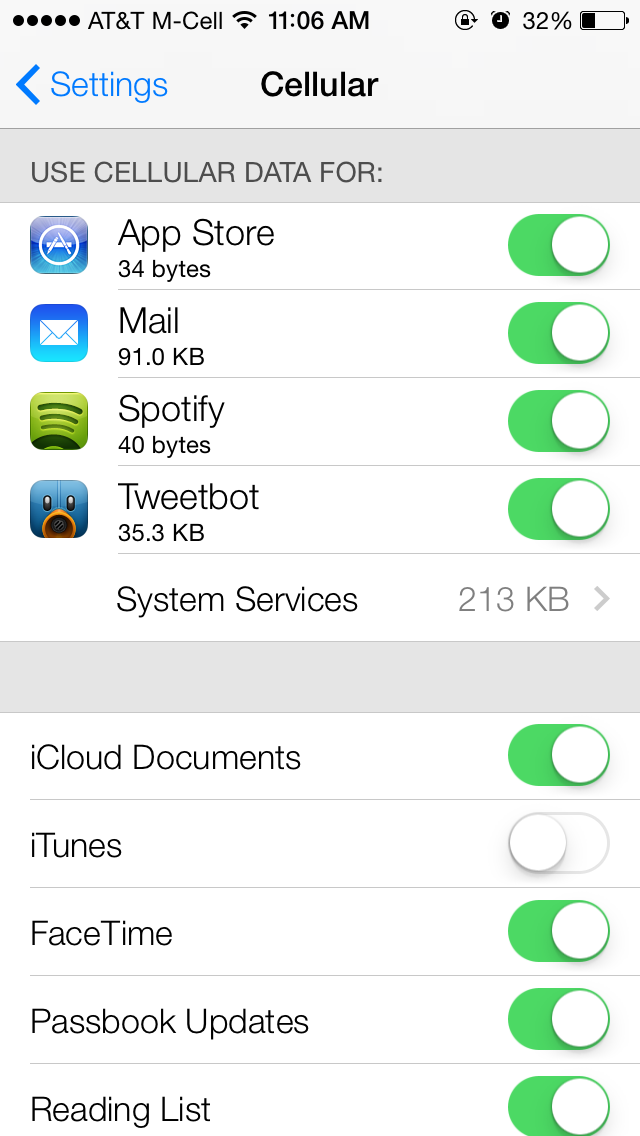
cellularWhile the most obvious change in iOS 7 is the look and feel of the user interface, Apple's engineers have packed the update with numerous changes both big and small. 

Here are a selection of changes noticed by folks in the MacRumors Forums and elsewhere. 

Cellular Data Tracking by App - In Settings / Cellular, users can track cellular data usage on a per-app basis. Apps can have their cellular data access disabled individually as well. 

Update Apps Manually - The App Store now updates apps automatically, but for users who prefer to handle things themselves, automatic updates can be disabled via a slider in Settings / iTunes & App Stores. 

How to Get to Spotlight - Spotlight is now accessible from the home screen by swiping down from the middle of the screen. Additionally, in Settings / General / Spotlight Search, users can manually turn search result categories on and off, as well as change the order results are presented in. 

Live Clock Icon - The clock icon provides the correct time, including a live second hand. The weather app does not update -- it is always partly cloudy. 

Newsstand Has Permanent Icon - Newsstand's icon remains the same regardless of what publications are inside it. The app itself works similarly, though the design is substantially different. Newsstand can now be put inside a folder as well. 

App Permission for Microphone Access - Apps are now required to ask permission to access the microphone, similar to how apps currently ask to access location data or the camera. 

Multitasking Switcher Works in Landscape - The app switcher works in landscape mode. Double-tap the home button to access. Control Center can also be used in landscape. Apps can also be manually quit by swiping up, and multiple apps can be closedat the same time. 

Landscapemultitasking

Skips in iTunes Radio - iTunes Radio listeners get 6 skips per station, regardless of if they are on the ad-supported or ad-free versions of the service. It is believed that the skips reset each hour. 

Parallax Everywhere - As part of the new 'layers' user interface that Jony Ive has built, nearly everything in the interface subtly shifts to give the UI depth when the phone is moved -- wallpaper, pop-up alerts, notification bubbles and more. 

Dynamic Wallpaper - Apple includes two 'dynamic' wallpaper images by default. These images have subtle animated bubble shapes floating around the background. We'll likely hear more about these going forward. 

Panoramic Wallpaper - In addition to the dynamic wallpaper, users can also setpanoramic images as wallpaper -- instead of the subtle parallax image shift shown in the keynote, tilting the phone pans around the image. The stuttering in the video below is due to capture method -- on the iPhone, it pans smoothly. 


iPhone 4 is Responsive - One forum member who installed iOS 7 on the iPhone 4 said the device was as responsive as under iOS 6, though many of the UI graphics trickery is disabled. 

'Mark All' in Mail.app - Users can now mark all messages as read in Mail.app. 

Share Passes - Passbook passes can be shared via iMessage or email. 

Navigation has Automatic Day/Night Mode - When viewing turn-by-turn directions, Maps automatically switches from day to night mode using both the current time and ambient light sensor to judge which is more appropriate. 

Navdayandnight
Dynamic Font Size - Users can select a system-wide font size for apps that support 'Dynamic Type' in Settings / General / Text Size. 

FaceTime Gets Own App - FaceTime has been spun out into its own app on the iPhone. Previously, it was built into the Phone app. 

Reminder Alerts Have More Options - Pop-up alerts from the Reminders app now offer options to 'Remind me in 15 minutes', 'Mark as Completed', 'View Reminder', or to simply close the notification.