In addition to confirming the HTC One Android 4.2 Jelly Bean update for arrival in mid-June, HTC Russia head Andrey Kormiltsev also has thrown weight behind the announced HTC One S Sense 5 update saying that the update may never arrive thanks to technical issues that are seemingly plaguing the software.
Over the past few weeks, we’ve heard rumors in regards to the HTC One S Sense 5 update, an update that was originally promised by HTC several months ago. While many other HTC devices that were confirmed to be getting the new Sense 5 update have seen positive information about their updates leak, the HTC One has seen only grim news emerge in the form of doubts about the update.
The HTC One S Sense 5 update is in serious trouble.
One source of that doubt has been @LLabTooFeR, an HTC insider who releases unofficial information about HTC Android 4.2 and Sense 5 updates on a very regular basis. Today, he is not the source of the information in regards to the HTC One Sense 5 update, instead, it’s an official from HTC Russia, Andrey Kormiltsev, who is talking about the update.
According to remarks from Kormiltsev, there is a good chance that the HTC One S Sense 5 update won’t roll out, thanks to technical issues that the device is apparently having. @LlabTooFeRseems to think it’s related to the processor types that are on board. The HTC One S runs either a Qualcomm Snapdragon S3 processor or a Qualcomm S4 processor and he believes that the troubled Taiwanese-based company does want to spend the money on porting Sense 5 to work with the S3 models.
That information is unconfirmed but the doubts of Kormiltsev, at the very least, paint a pretty grim picture for owners of the mid-range HTC One S, hoping for Sense 5. T-Mobile owners who upgraded to Android 4.1 encountered a ton of lag with the update so it’s not surprising to see new updates under fire.
This of course is not a death knell and it’s entirely possible that HTC will forge ahead and release both Android 4.2 and Sense 5, or perhaps even Android 4.2 on its own. Still, at this point, HTC One S owners should start preparing for the worst.
Intel Executive Vice President Tom Kilroy officially announces the fourth-generation Core processor at Computex.
In a series of events at Computex today, Intel officially unveiled its fourth-generation Core processors. The company said its latest chip is the foundation of a new breed of 2-in-1 devices up to “aspirational” premium Ultrabook convertibles. At the same time Intel said its upcoming Silvermont Atom processors--originally designed for smartphones and tablets--would be extended into entry-level notebooks, convertibles and all-in-one desktops starting as low as $400.
Intel Executive Vice President Tom Kilroy said in his opening keynote that the PC of the past is dying. “The 2-in-1 is the new norm,” he said. “It is a laptop when you need it. It is a tablet when you want it.” Intel said there are more than 50 different 2-in-1 designs in the works based on either the fourth-generation Core (Haswell) or Silvermont processors.
Kilroy described Haswell as the industry’s first PC System-on-Chip (SoC) and the company’s first designed from the start for Ultrabooks and 2-in-1s. It delivers the largest generational improvement in battery life in Intel’s history with 50 percent better battery life under active workloads and up to 13 days of standby time compared with four days with the current Ivy Bridge processors. The new graphics, branded Iris, deliver twice the performance of Ivy Bridge pushing it to the same level as discrete graphics, he said.
Like most mainstream chips, the Haswell mobile processors were originally designed with a 35-watt power rating, but Kilroy said the engineers “ripped up the roadmap” and cut the power down to as little as 6 watts on some versions (keep in mind though that Intel now uses a different method to measure power for these low-voltage parts). Kilroy showed some early 2-in-1 designs from Acer, Asus, Dell, HP, Lenovo, Panasonic and Toshiba and he held up an extremely thin, fanless slate to illustrate what was possible with a 6-watt Core processor. With these, Kilroy said, you’ll no longer need to choose between a PC (high performance, multi-tasking, productivity, PC applications) and a tablet (simple touch interface, light weight and thin design, long battery life, and apps ecosystem).
While this sounds compelling, don’t expect to see these sorts of Haswell 2-in-1s until sometime around September or October. That’s because the fourth-generation Core processors announced today are mostly quad-cores with higher power ratings designed for standard desktops and mainstream laptops. Today’s lineup includes:
Kilroy said that Intel has “busted the x86 power myth” and is starting to gain traction in smartphones and especially in tablets. He said there are dozens of Intel-based tablets in the market now, and noted several new announcements at Computex including the Samsung Galaxy Tab 3, Acer Iconia W3 and Asus Fonepad Note. Silvermont will deliver either a 3x increase in performance or a 5x reduction in power. The Bay Trail-T platform will ship later this year with the first Android and Windows 8 tablets appearing in time of the holidays while the first Merrifield smartphones will arrive at Mobile World Congress in early 2014.
Intel demonstrated a Bay Trail-T tablet playing a PC game (Runic Games’ Torchlight II, a role-playing game) and playing a 4K video streaming over 4G LTE on a test network using the company’s own multimode LTE baseband. He later said that the XMM 7160 LTE baseband would be coming to market this year. Intel will also release Bay Trail-M and Bay Trail-D platforms to push down prices of laptops and all-in-one desktops, respectively.
In a separate event, Kirk Skaugen, a senior vice president and General Manager of the PC Client Group, gave more details on some of the 2-in-1 devices coming to market and described some of the user experiences they will enable. He said that there are “hundreds” of Haswell systems launching starting today with Ultrabooks coming in a few months and vPro Ultrabooks for business users arriving by the end of the year.
The number of 2-in-1 designs available will increase 10x by the holidays and the number of laptops with touchscreens has increased three times from Ivy Bridge to Haswell. “Touch is going to go broad on Haswell,” Skaugen said. “Almost every design in the notebook category is going to have the capability of touch.” Laptops with touchscreens are already available for as low as $529.
Intel showed several 2-in-1 models including an Acer convertible, Dell XPS 11 tablet and XPS 12 convertible, Lenovo’s next-generation Yoga, Panasonic Let’s Note hybrid, a Sony VAIO Duo and a Toshiba Portege convertible. HP is likely to ship the first fanless Haswell design later this year. Skaugen talked about how Haswell is Intel’s most scalable architecture ranging from these 6-watt fanless designs all the way to a single Core i7 chip with Iris Pro graphics capable of 1 teraflop. He showed an MSI Ultrabook capable of a teraflop (300 gigaflops from the CPU and 700 gigaflops from the graphics) in a thin and light package. In general the new Iris graphics deliver good enough performance to go after 80 percent of the discrete graphics market, Skaugen said, while using less board area and power.
Skaugen then shifted to what you can do with this hardware. Aside from touch, Intel demonstrated high-resolution displays like the qHD display (2560x1440) on Dell’s XPS 11, the use of an active stylus on the Sony VAIO Duo, a new secure payment technology using NFC, a 720p videoconferencing system for China’s Tencent, Intel’s WiDi wireless display technology, voice and face recognition and gesture control.
WiDi receivers are in 10 million TVs today and Intel announced a deal with Samsung to double that later this year. Intel is also hoping to double the number of laptops with WiDi from 40 million today. Intel very briefly demonstrated a facial recognition feature, the oddly-named Sensible Vision Facial Login Solution, which was surprisingly fast. It will be available on Asus and Sony laptops.
The Nuance Dragon Assist voice command and control software, which is currently in beta and available for Dell PCs, will also be available on Acer, Asus and Lenovo PCs—a total of 10 systems--and will be sold through Best Buy in time for Back to School. The software will be available in nine languages in 27 countries by the end of the year and Intel is requiring dual-array microphones on Haswell Ultrabooks to ensure it works well in noisy environments.
Last year at its annual developer forum Intel announced the Perceptual Computing SDK (Software Developer’s Kit) for gesture recognition, which included a Creative 3-D depth camera. The Creative Senz3D camera will be available in the third quarter along with a free Perceptual Pack for Portal 2 allowing users to control the popular game with gestures. Skaugen also announced a $100 million Experiences & Perceptual Computing Fund to jumpstart the development of gesture-controlled software. But the big surprise was that Intel has been quietly working on its own 3-D camera technology, which it plans to start integrating into even thin Ultrabooks. Dell and Lenovo have already committed to using it in some systems starting in in late 2014, he said. HP recently announced a deal with Leap Motion to integrate its competing motion controller into some systems.
Skaugen noted that there are more than 500 million PCs out there that are at least four years old. All of this work to reinvent the PC and establish a 2-in-1 category is designed to convince those uses that it’s time to upgrade.
Last month, as you might recall, BlackBerry CEO Thorsten Heins announced thatBBM will indeed be coming to iOS and Android. With 10 billion messagesbetween BlackBerry users already processed daily, you can just imagine how this service will grow after it goes cross-platform. Which bring us to the main point of this story.
If you come across a link to a website offering you the opportunity to download a beta for BBM for iOS or BBM for Android, immediately shut down that tab, go fishing, bicycle to 7-11 for a Slurpee or grow a beard. Just do not follow through on the offer. Some ne'er do well disguised a website to make it look like an official BlackBerry site offering you a download with an iOS .ipa file and an Android .apk file. If you get this far, unplug your computer. Take a cold shower or watch CSpan. The download page apparently loads a virus on your PC. Yeah, it's not your phone so who cares. We get it. But your PC can still be an important part of your mobile experience, so why let it get destroyed by a virus?
Even if you just skim our Computex coverage, you'll quickly see
there's a theme tying it all together: displays. Super-high-resolution
displays. It's true of every company we've seen, really, but moving
beyond 1080p seems especially important to ASUS. So far, the firm has
shown off a pair of 4K displays, along with its first 2,560 x 1,600 tablet.
Now, it's unveiling its first all-in-one desktop with QHD resolution.
That would be the ET2702, which comes standard with a 27-inch, 2,560 x
1,440 IPS screen. Though we admittedly only spent a few moments with it,
we noticed the colors held up even under the glare of the harsh
lighting in Taipei's Nangang Exhibition Center. We were also taken with
the design, which includes an edge-to-edge glass display layered over a
long speaker grille. There are some other modern touches, too, like
white LED lights, a matte aluminum pedestal and a metal mouse to match.
Speaking of that mouse, it's one of the nicer ones we've seen tossed in
with an all-in-one: aside from the quality build materials, it has a
touch strip providing haptic feedback. The included keyboard is
well-spaced and easy to type on as well.
In the US, at least, there will be just one configuration to start,
with key specs including: a Core i7-4770 processor, a 2GB AMD Radeon HD
8890A GPU, 16GB of RAM, a 2TB hard drive, 802.11ac and a Blu-ray drive.
It'll arrive in either late July or early August, we're told, with a
price around $2,000, if not slightly less. For a closer look, we've got
hands-on photos below and a short walkthrough video after the break.
Xero and Stripe — two cloud software application companies backed by PayPal co-founder Peter Thiel — are linking up to create tighter integration between their services.
Under the new relationship, small businesses that use the Xero accounting software to keep their books and manage financial information can now accept online payments more readily using the Stripe processing service, which makes it simpler to receive online credit-card payments and other electronic transactions through Web sites.
Existing Stripe customers that don't already use Xero will get a free 60-day trial subscription to the service.
It's just the latest in a string of integration relationships announced by Xero creating more value around the small business accounting service, which is used by more than 150,000 paying customers around the globe.
Recognizing that ensuring prompt payments is a perpetual challenge for small companies, Xero is also partnering with DPS Payments and GoCardless to bring similar services to companies outside the United States.
Caitlin MacGregor, co-founder of Cream.hr, underscored the importance of online payment systems for startups, entrepreneurs and small companies:
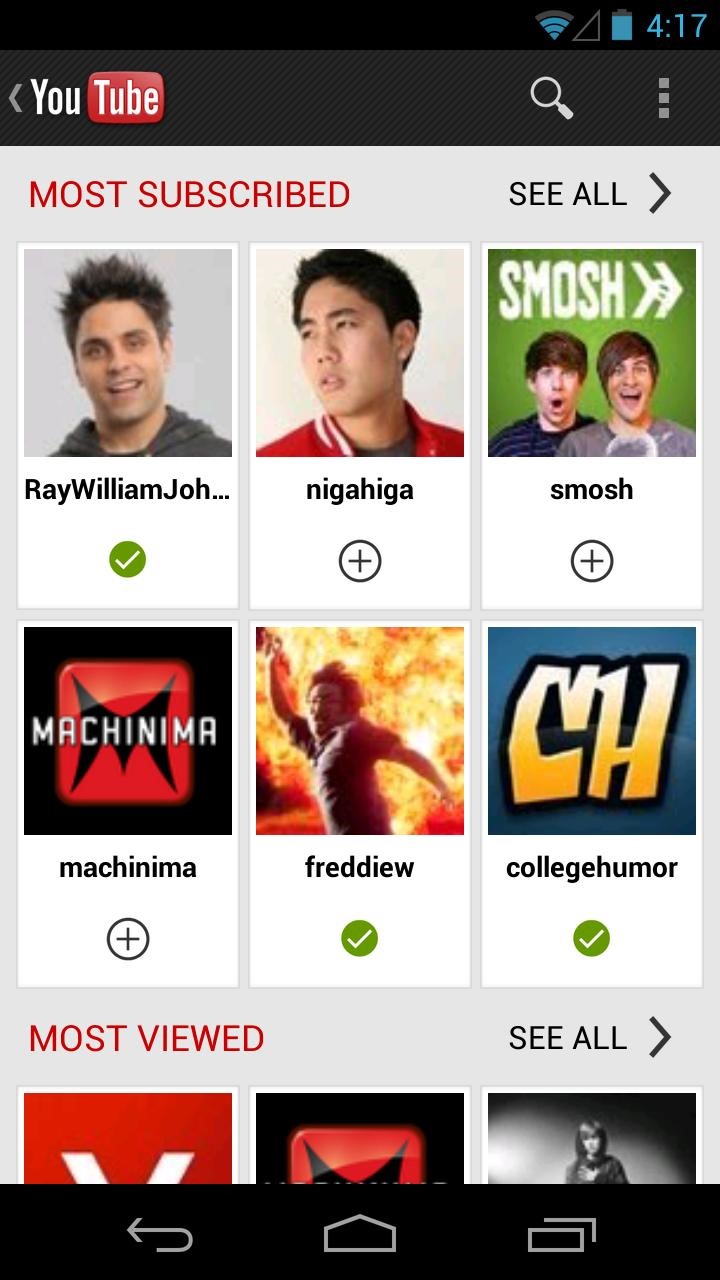
Google is slowly adding the new slide-out navigation menu to all of
its major Android apps, and today it's YouTube's turn. The latest
incremental update to the official video app doesn't add a whole lot
more than that, but what's there is handy: the menu that used to be
available via the "app button" in the upper-left corner only on the
homescreen is now enabled on all standard UI screens with a quick swipe
to the left, just like in the shiny new version of Gmail. As always, YouTube is a free download, available for all Android users.
Strangely, the app button uses the little "back" icon everywhere, not just in UI screens where it will actually go back,
and has not yet been switched to the "hamburger" menu button. (For an
explanation of why this is matters, check out Ron Amadeo's breakdown of the new sidebar design standards.)
The only other major addition to the app is "video
suggestion overlays during playback," but I haven't gotten anything to
appear in any of the videos I've tried. The standard improvements and
bugfixes have been applied, and at least some Play Store reviews cite a
noticeable improvement in stability and streaming performance.
What's in this version:
* Open the guide from anywhere in the app for quick access to your subscriptions and feeds * Video suggestion overlays during playback * Bug fixes and stability improvements
Currently available only in China, thedual SIM version of HTC Onewill be also released in Europe pretty soon. Well, at least Russia is going to get it.
Hi-tech@Mail.rureports that the dual SIM HTC One will cost 29,990 RUB. That’s about €720, or $960. And yes, it’s an insanely high price, but phone prices in Russia are usually that way.
It’s not clear if the dual SIM One will be introduced in other European markets. Anyway, this version has 32GB of internal memory, and all the other features you get with the regular One, including Android Jelly Bean, Sense 5 UI, a 4.7 inch Full HD display, 4MP Ultrapixel rear camera, 2GB of RAM, and a quad-core 1.7GHz processor.
Just a couple of weeks ago, HTC announced theDesire 600, which comes with dual SIM capabilities out of the box. The Desire 600 also runs Android Jelly Bean, and should be launched starting this month (including in Russia).
When you set out to map the entire Earth, if you do it right, you're going to end up witha lotof data. Google Maps has a constant stream of information coming in from a ton of sources - its own Street View cars, satellite imagery, governments, and users all over the world. Once you have all of that information, how do you deal with it? What happens when the government map doesn't perfectly match the satellite image? How do you make sure that a "No Left Turn" sign is reflected in the turn-by-turn directions?
As outsiders, we've always just assumed the answer to this is "magic," but it turns out, it's all handled by a program called "Google Atlas" - an internal-only tool used to manage Google Maps data. We caught a 5-second glimpse of it a year ago ina promotional video for the "Report A Problem" feature, but that wasn't nearly long enough to understand what was going on.
At I/O, Google decided to lift back the curtain and show us just how Google Maps is made. If you don't want to watch the full 40 minute video, the Atlas stuffstarts at 7:30. You'll see a great walkthrough of just how Atlas works, and how Google combines all of this conflicting data from different sources. In the end, there is no silver bullet; it's just a lot of work that takes a lot of people. Still, it's fascinating to see just how it works, how user-friendly it all seems, and how much of an insane project Google Maps really is.
The whole video is a great watch, so kick back, relax, and, while you're watching, think about just how hard it is for Apple and other competitors to attempt to replicate even a small fraction of Google's mapping juggernaut.
What? You don't have a Sphero?
Well, you're going to need one to play this amusing free game. Sphero
is a neat little ball-shaped robot that rolls around in response to
things going on inside your phone. In this case it rolls around your
floor killing augmented reality zombies with fireballs. That's got
pretty much all the makings of something awesome.
So you point your device's camera at the Sphero, and the undead will
attack. As you guide your sphere of death around in real life, the
virtual zombies respond to it. You can play the game anyplace there is a
flat enough surface for the Sphero to roll around on.
Spartan Assault sees Halo move into your pocket, as the popular
gaming franchise makes its move onto Windows and away from the console.
We got our hands on an early build of Halo: Spartan Assault prior to release, playing the game on Windows Phone 8 on the Nokia Lumia 928, as well as on Windows 8 on the Surface Pro tablet.
Halo: Spartan Assault is an entirely new Halo game, built from
scratch for mobile devices: it isn't a port or a reworking of an
existing console game. As such it segues into the existing Halo
universe, whilst not being entirely dependent on the happenings of prior
games.
As a spokesperson from 343 Industries told us, the game has been
designed to appeal to Halo fans and the casual mobile gamer alike. That
means that whilst the control mechanisms make this game easy to
pick-up-and-play, if you've spent any time with previous Halo games,
you'll recognise characters, and the missions will have a wider context
in terms of the Halo universe story.
There's a twist, however, when it comes to the story. To ensure that
Halo: Spartan Assault doesn't railroad into the middle of Halo lore, 343
Industries says that Spartan Assault is actually a simulation, running
aboard Infinity for Spartans to train. A convenient caveat, but also an
effective mechanism.
This arrangement means that Spartan Assault can give you missions
that have Halo context, but can survive in isolation. The central
character of Spartan Assault at launch is Sarah Palmer and much of what
you play relates to her character story.
The story is brought to life with cinematics, which from the example
we were shown look and sound fantastic on a mobile device, so you're not
just pitched into an abstract mission, you're told why this mission is
of significance. Before you start a level, you have a brief synopsis
page as well as a tactical map, so it's pretty easy to determine what
you have to do.
Story, context and narrative techniques aside, many will be more
interested in getting into the action. Many mobile games are thwarted by
the same control issues. As such, 343 Industries' Dan Ayoub told us
that they'd thrown out "about a dozen" control mechanisms before
settling on the dual thumb controls.
However, rather than two static locations for those controls, they
cater for creep, where your thumb slips off to a different location on
the surface of the display. Rather than losing control, the controls
simply moves with you.
In practice this seems to work and from the 30 mins or so of playtime
that we had, we found that slippage wasn't a problem. Occasionally we'd
find that we'd slipped to the edge of the device we were playing on,
but generally speaking, the controls work.
Those two "thumb" controls give you directional movement for your
character or vehicle on the left, whilst the right stick handles the
direction of fire. This is a top-down shooter, so the controls work
well: as the enemy moves around you, you can move your character in any
direction the environment allows, as well as fire in any direction.
Your skills amount to more than just blasting away with your primary
weapon however. As you'd expect, you can carry a secondary weapon, as
well as grenades and you have other skills too. There are some weapons
and skills unique to Spartan Assault that you won't have seen elsewhere
in Halo.
You get the chance to change your loadout before you start a mission,
as well as being able to switch to weapons you find on the battlefield,
as well as jack vehicles, as you'd expect. To begin with only ground
vehicles are supported, and our brief time in a Wraith proved fun.
There's a lot going on too. Thankfully there's plenty of detail and
the rich graphics of the Surface Pro soon had us hooked. The Windows
Phone 8 build we saw was earlier in development, so missing some
graphical elements, but still looked great. We also had it confirmed by
343i executive producer Dan Ayoub, that Halo Spartan Assault will run on
all Windows Phone 8 devices, from the entry-level to the high-end.
There's an achievement system and medals to collect, as well as
challenges to keep you playing and one of the features we really like
the sound of is cross-device syncing. To keep Halo: Spartan Assault on
point across your devices, the game will support auto cloud saves, so
you can play a little on your Windows PC, then resume on your Windows
Phone 8 once you leave the house.
We've not seen this in action, and the build we were playing didn't
have any support for incremental saves: each time we died, we restarted
the mission. And die we did, because Halo: Spartan Assault is no
pushover. It has been designed to play as a AAA title and it left us
wanting more. Although it's easy enough to pick up and play, it feels
like there's more to the game than just blasting your way through.
As a first impression, that's really important to us. Not only
because this game is flying the flag for a huge franchise, but because
mobile gaming is getting more and more impressive, offering more depth,
better graphics and an experience that's worth the investment of your
time.
Halo: Spartan Assault will be launching in July 2013, pricing is still to be confirmed. It will, however, be Windows only.